You can count on a capacitive touch display for hard work in factories. These displays last through lots of use because they have features like:
Hard glass that does not scratch easily
Good protection from water and changes in temperature
Works well even when there is electrical stress
Does not get ruined by cleaning products or strong chemicals
You get a display that keeps working even when things get tough.
Capacitive touch displays are made to work in hard places. They have strong glass and metal cases to help them last longer.
Always check the IP rating before you buy one. A higher rating means it keeps out more dust and water. This helps the display work well in rough spots.
Clean and take care of your display often. Use a soft cloth and safe cleaners to keep the screen working right.
Pick displays that let you use more than one touch at once. This makes it easier to use, even with gloves or a stylus.
Look for certifications like CE Marking and ISO standards. These show the display is safe and good for industrial jobs.
A capacitive touch display can handle tough jobs in factories. Makers use strong parts and smart ideas to make these displays last longer. Here are some things that help the display stay strong:
Metal housing keeps the display safe from hits and falls.
Chemically strengthened glass helps stop scratches and cracks.
Anti-scratch coatings give extra protection from sharp things.
Optical bonding technology takes away air gaps and adds resin. This helps the display take in shocks and shakes.
Sealed edges block dust and water, so the display works in dirty or wet places.
The display also has advanced technology inside. Projected capacitive technology, or P-Cap, makes the screen very sensitive. You can use the display with a light touch, and it reacts fast. Multi-touch lets you use moves like pinch-to-zoom or swipe with more than one finger. This makes the display simple to use, even if you wear gloves or need to work quickly.
Tip: Try to find displays with an IK10 rating. This means the screen can take hits up to 20 joules, which is enough for most hard jobs.
You want your capacitive touch display to follow strict rules. These certifications show the display is safe, works well, and is made for tough jobs.
Certification/Standard | Description |
|---|---|
CE Marking | Follows rules for electrical safety and emissions. |
RoHS Compliance | Limits bad materials in electronics. |
WEEE Compliance | Helps with recycling and safe disposal. |
ISO 9001 | Checks for good quality in making products. |
ISO 14001 | Cares about the environment. |
ISO 45001 | Makes sure the workplace is safe. |
ENERGY STAR | Shows the display saves energy. |
IEC 61747 | Sets rules for how displays should work. |
ASTM International | Tests how strong and good the display is. |
If you pick a capacitive touch display with these features and certifications, you get a product that can handle your job’s needs.
You need a display that works in dirty and wet places. A capacitive touch display can handle these tough spots. You see these displays in factories, hospitals, and outdoor kiosks. They keep working even when dust and water are everywhere.
Moisture-resistant coatings help keep water off the screen.
Sealed construction stops dust and dirt from getting inside.
You can use them in very humid places without problems.
Many industrial displays have high IP ratings. These ratings show how well the display blocks dust and water. Here is a simple guide:
IP Rating | Description |
|---|---|
IP65 | Keeps out dust and protects from water jets. Good for factory floors, outdoor kiosks, and food service. |
IP67 | Keeps out dust and can handle short dips in water. Best for places with flooding or steam cleaning, like food plants or kitchens. |
Tip: Always check the IP rating before you pick a display for your job. Bigger numbers mean the display is better protected.
You want your display to work in hot, cold, or changing temperatures. A capacitive touch display can handle a wide range of temperatures. Some models work in freezing cold or very hot places.
Source | Temperature Range |
|---|---|
Faytech | -20°C to +70°C |
STTouch | 0°C to 40°C (standard), up to 70°C (extreme) |
Panox Display | -20°C to 70°C |
You also need a display that can handle strong cleaners and chemicals. Many displays use special coatings and tough glass. These features help the display last longer, even with daily cleaning.
Aspect | Description |
|---|---|
Chemical Resistance | Lets you use the display with strong cleaning agents and chemicals. |
Cleaning Agent Compatibility | Makes cleaning easy and keeps the display working longer. |
Sanitization Resistance | Handles alcohol-based sanitizers and disinfectants without damage. |
Surface Treatments | Oleophobic and hydrophobic coatings make cleaning better and protect against chemicals. |
Industrial displays go through tough tests. These tests check if the display can handle heat, cold, humidity, and dirt.
Testing Protocol | Description |
|---|---|
Temperature Cycling | The display faces hot and cold cycles to check for stability. |
Humidity Testing | The display runs in high humidity to test moisture resistance. |
Contamination Testing | The display gets exposed to liquids and particles to check for leaks or damage. |
You often wear gloves or use a stylus at work. A capacitive touch display lets you keep your gloves on and still use the screen. This helps you stay safe and work faster.
You can use medical gloves in hospitals to keep things clean.
You can use protective gloves in factories to stay safe.
You can use a stylus for more control or when your hands are dirty.
Touchscreen-compatible gloves and high-quality styluses work best.
Clean the screen often and adjust sensitivity for the best results.
You also need to see the display in bright sunlight. Many industrial displays have high brightness levels, so you can read the screen outside.
Brightness Level | Context |
|---|---|
600 – 800 nits | Good for outdoor visibility |
Note: High brightness helps you see the screen in sunlight, so you do not miss important information.
A capacitive touch display gives you the tools to work in any condition. You get a screen that works in dust, water, heat, cold, and with gloves or a stylus.
You want your capacitive touch display to work for a long time. Taking care of it helps the screen last longer. Cleaning is important because dust and dirt can stop the touch from working right. Use a microfiber cloth every day to wipe the screen. For a deeper clean, mix distilled water and isopropyl alcohol. Clean the screen once a week or every two weeks. In busy places like factories, clean more often to stop grime from building up.
Turn off the device before you clean it.
Only use cleaning materials that are safe for the screen.
Do not press hard on the screen.
Update the firmware and drivers to keep things working well.
Tip: Make a cleaning plan and follow it. This helps stop problems and keeps the screen working well.
Industrial screens have to deal with hard jobs. Sometimes, the screen does not work, touches happen by mistake, or the touch points move. Most problems come from dirt, damage, or electrical issues. You can fix many problems with easy steps.
Failure Point | Cause/Issue Description | Solution/Addressing Method |
|---|---|---|
Screen not responding | Dirt or foreign objects on the screen | Wipe with a soft cloth |
Damage or wear to the touch screen | Replace the touch screen | |
Fault in the touch chip | Replace the chip | |
Accidental touch or drift | Fault in the touch chip | Replace the chip |
Environmental factors | Change the brightness or move the screen | |
Lack of sensitivity | Thick glass | Recalibrate the firmware |
Gloves make it hard to sense touch | Adjust the firmware for gloves | |
Jumping points | Static electricity or unstable voltage | Make sure the device is grounded |
Ghost touching | Electromagnetic interference | Use good screens and strong insulation |
Most failures can be stopped with good cleaning and regular checks. If the screen acts strange, check for dirt first. If cleaning does not help, you might need to change parts or settings.
Industrial screens are made to last a long time. Most have a mean time between failures (MTBF) of 50,000 to 100,000 hours. This means you can use them for 5 to 10 years without stopping.
Display Type | MTBF (Hours) | Expected Lifespan | Typical Usage Pattern |
|---|---|---|---|
Industrial LCD | 50,000-100,000 | 5-10 years | Used all the time |
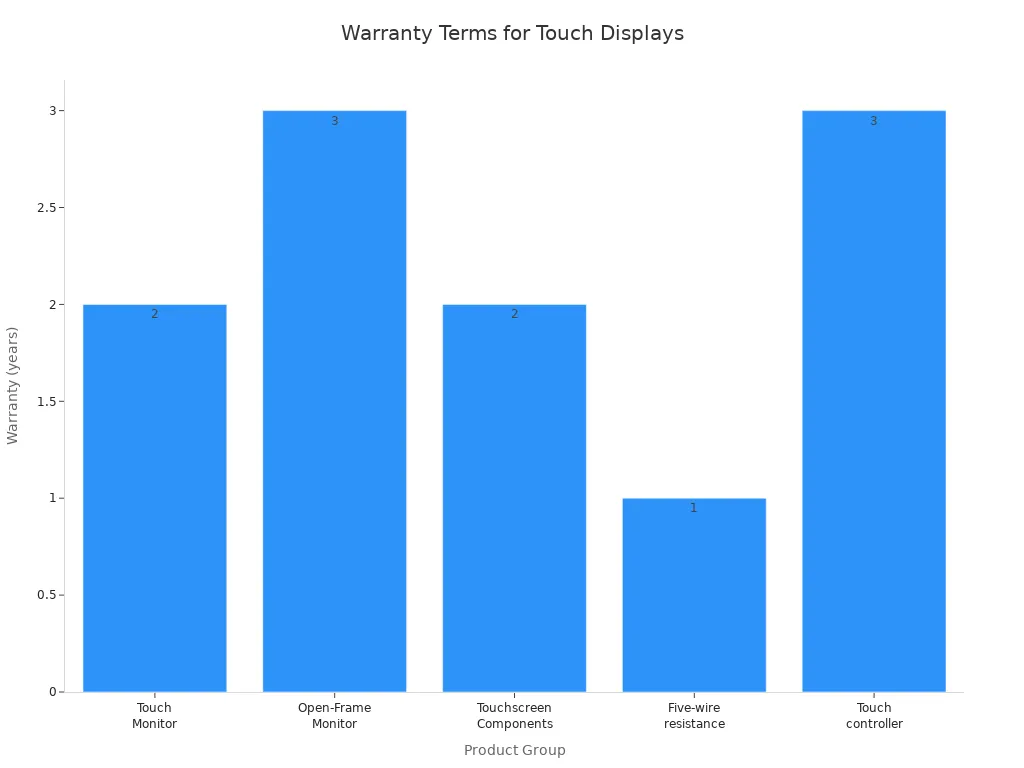
Manufacturers give warranties to show their products are strong. You usually get 2 to 3 years for monitors and touch controllers.
Product Group | Warranty |
|---|---|
Touch Monitor | 2 years |
Open-Frame Monitor | 3 years |
Touchscreen Components | 2 years |
Touch controller | 3 years |
You get a screen that can handle lots of use, strong cleaning, and different places. If you take care of it, your screen will last for many years.
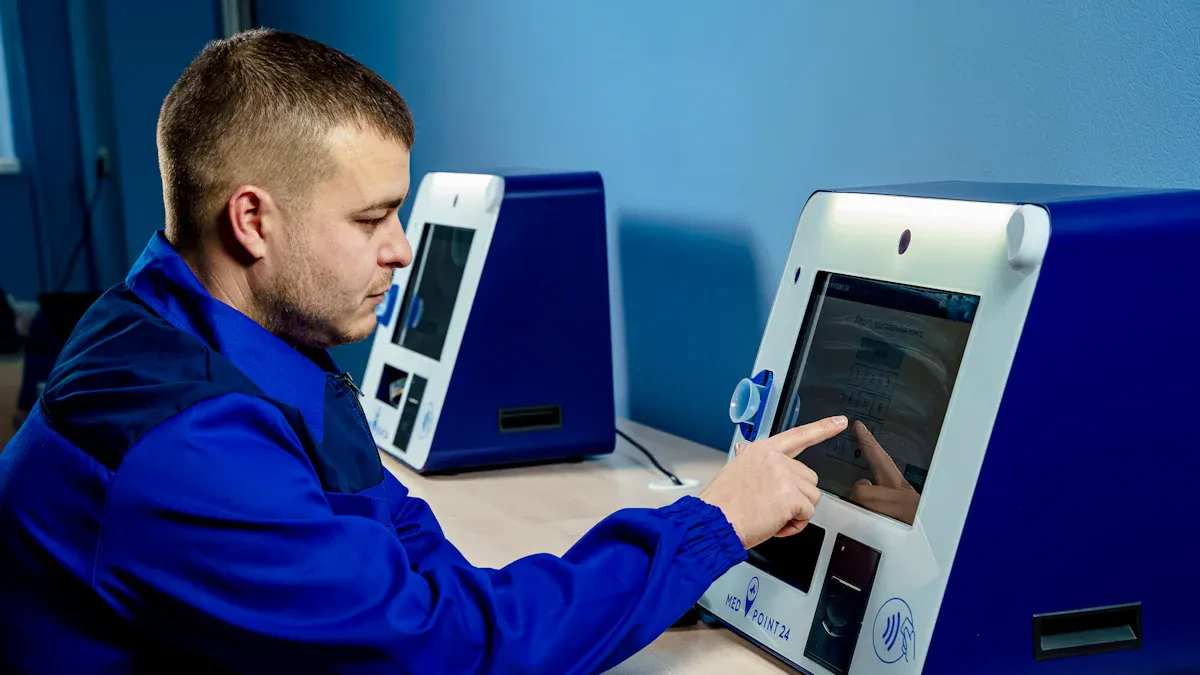
Capacitive touch displays are used in many factories. They help you control machines with a simple touch. You see them in panel PCs, rugged tablets, and HMIs. These screens take the place of old buttons and switches. This makes work easier and more modern.
You can use them to control machines.
You can check inventory and manage orders.
You can look at maintenance records and get info quickly.
The flat screens are easy to clean. You do not need to worry about dust or chemicals. These screens work well in loud places because they have no moving parts. They also have backlighting and haptic feedback. These features make the screens easier to use. Multi-touch lets you zoom or swipe to finish tasks fast.
Tip: Touch screens help you learn new systems quickly. You spend less time training and more time working.
You also see these screens in outdoor and heavy jobs. They work at construction sites, mines, and transport hubs. These places are tough for screens.
Environmental Stressor | Impact on Touch Displays |
|---|---|
Liquid Contamination | Can cause wrong touches or block real ones. |
Temperature Extremes | Can change how the screen senses touch. |
Particulate Contamination | Dust and dirt can make the screen slow. |
Vibration and Shock | Machines can shake the screen and affect how it works. |
Electromagnetic Interference | Big tools can mess up the touch circuits. |
You can use the screens with gloves or a stylus. High brightness helps you see the screen in sunlight. The strong design keeps the screen working when things get rough.
You can pick from many sizes and prices.
Type of Touch Screen | Size Range |
|---|---|
Projected Capacitive Touch Screens | 7 to 55 inches |
Infrared Touch Screens | 10.4 to 80+ inches |
Feature Type | Price Range |
|---|---|
Industrial Capacitive Displays | $150–$1,500 |
21–55 inches | $500–$2,000+ |
Projected Capacitive (PCAP) | $50–$1,500 |
Surface Capacitive | $20–$500 |
Custom Touch Displays | $100–$5,000+ |
You get a display that fits your space and budget. Pick a small screen for tight spots or a big one for large machines. You can add special features for your job.
You can count on a capacitive touch display for hard work. People who work in factories like these displays because they are strong. They do not break easily, even in tough places. The display also works well with electricity and does not get damaged. You can use these screens to make work faster and more accurate. They help you check things right away. When picking a display, look for multi-touch, strong build, and good connections.
Selection Criteria | Description |
|---|---|
Ruggedness | Handles rough places and lots of use |
Connectivity | Makes sure data moves without problems |
Customization Options | Lets you pick what your job needs |
Tip: Try the display where you will use it before buying a lot. This helps you know if it is right for your work.
Yes, you can use many industrial capacitive touch displays with wet hands. Manufacturers design these screens to sense touch even with moisture. You should check the product specs for best results.
Use a soft microfiber cloth. Mix distilled water and isopropyl alcohol. Turn off the device before cleaning. Do not press hard on the screen. Avoid harsh chemicals unless the display supports them.
Small scratches usually do not affect touch. Many displays have anti-scratch coatings. If you see deep scratches, you may need to replace the glass. Always use proper cleaning tools to prevent damage.
Yes, many industrial displays have high brightness levels. You can read the screen outdoors or in bright light. Look for displays with 600 nits or more for the best visibility.
Please leave a message, we will get in touch with you as soon as possible!


2nd Floor, Building A3, Southern Pearl Technology Park, Yingtai Road, Longhua District, Shenzhen, Guangdong


